
Platform



Use your time for what really matters. Get started for free


Customers
Resources


Use your time for what really matters. Get started for free
Pricing

Say goodbye to errors in spreadsheets.
Use your time for what really matters.







.png)
How users save 12 hours each month
Effortless consolidation. Built for your complexity
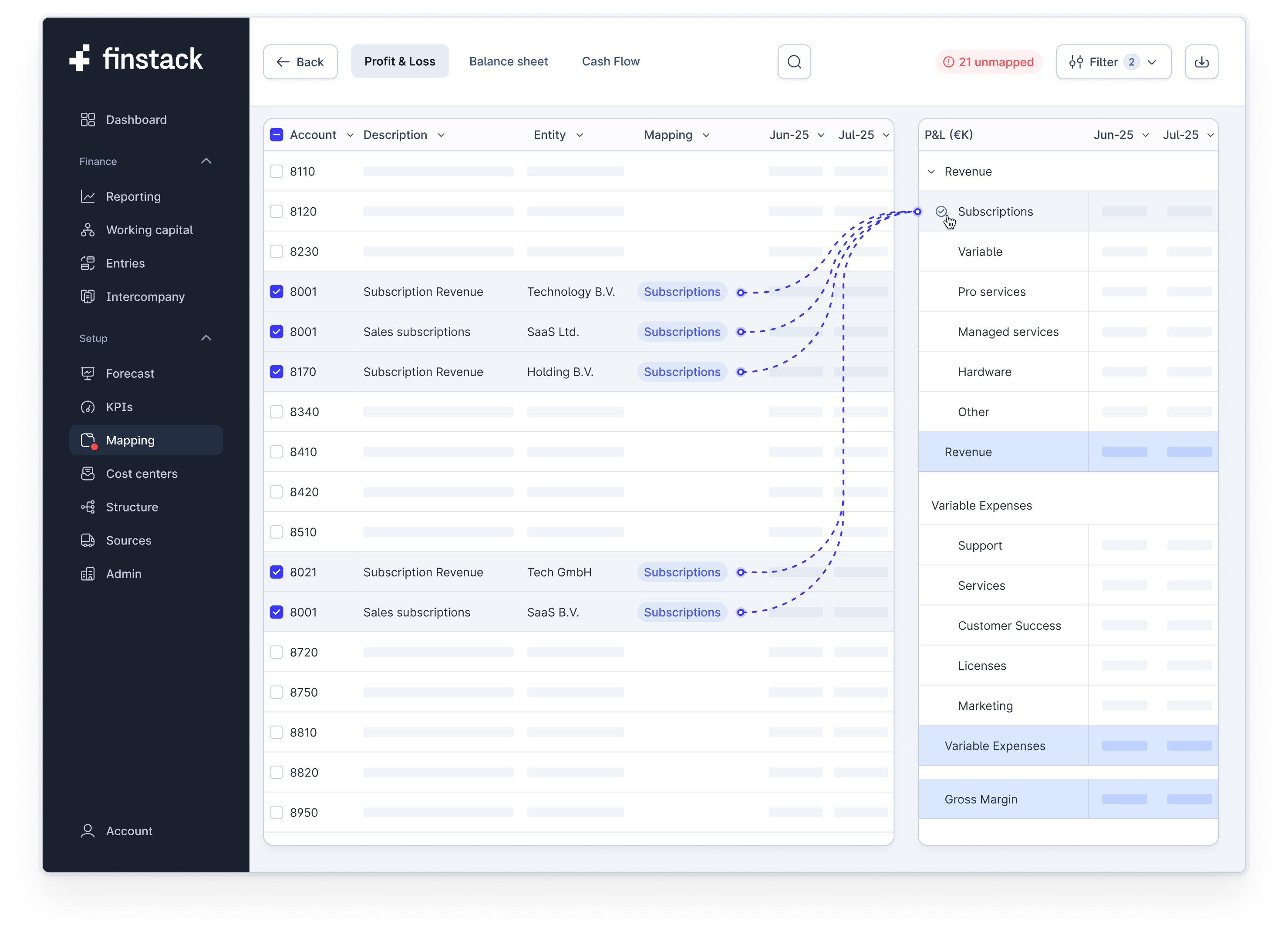
Stop wasting hours on messy spreadsheets. Map accounts with one click, catch new ones instantly, and automate eliminations without losing oversight.
Stay in control with reconciliations flagged as they happen. Every mismatch is surfaced with full detail, so your close runs faster and with confidence.
.png)
.png)
Convert any currency with ease using compliant rates. Historical data stays consistent, and you can fetch or set rates anytime without breaking your flow.
Group reporting across currencies stays transparent, accurate, and easy to manage, giving you confidence in every close.
Minority stakes are applied instantly and consistently, cutting out manual fixes and reducing the risk of errors in every close.
Easily adjust ownership percentages as structures change. Results update automatically, keeping your reports accurate and your group picture clear.
.png)
.png)
Manage groups at any level without manual work. Create sub-consolidations by region, division, or holding structure with accuracy built in.
Your consolidated view updates automatically as ownership shifts. From a few entities to global groups, you always see the right numbers.
Make targeted consolidations in just a few clicks. Eliminate mismatches between entities and generate clear statements instantly.
Drill into balances, eliminations, and differences at any level. Every adjustment stays transparent, giving you precision where you need it most.
.png)
Always live data. Shown your way
.png)
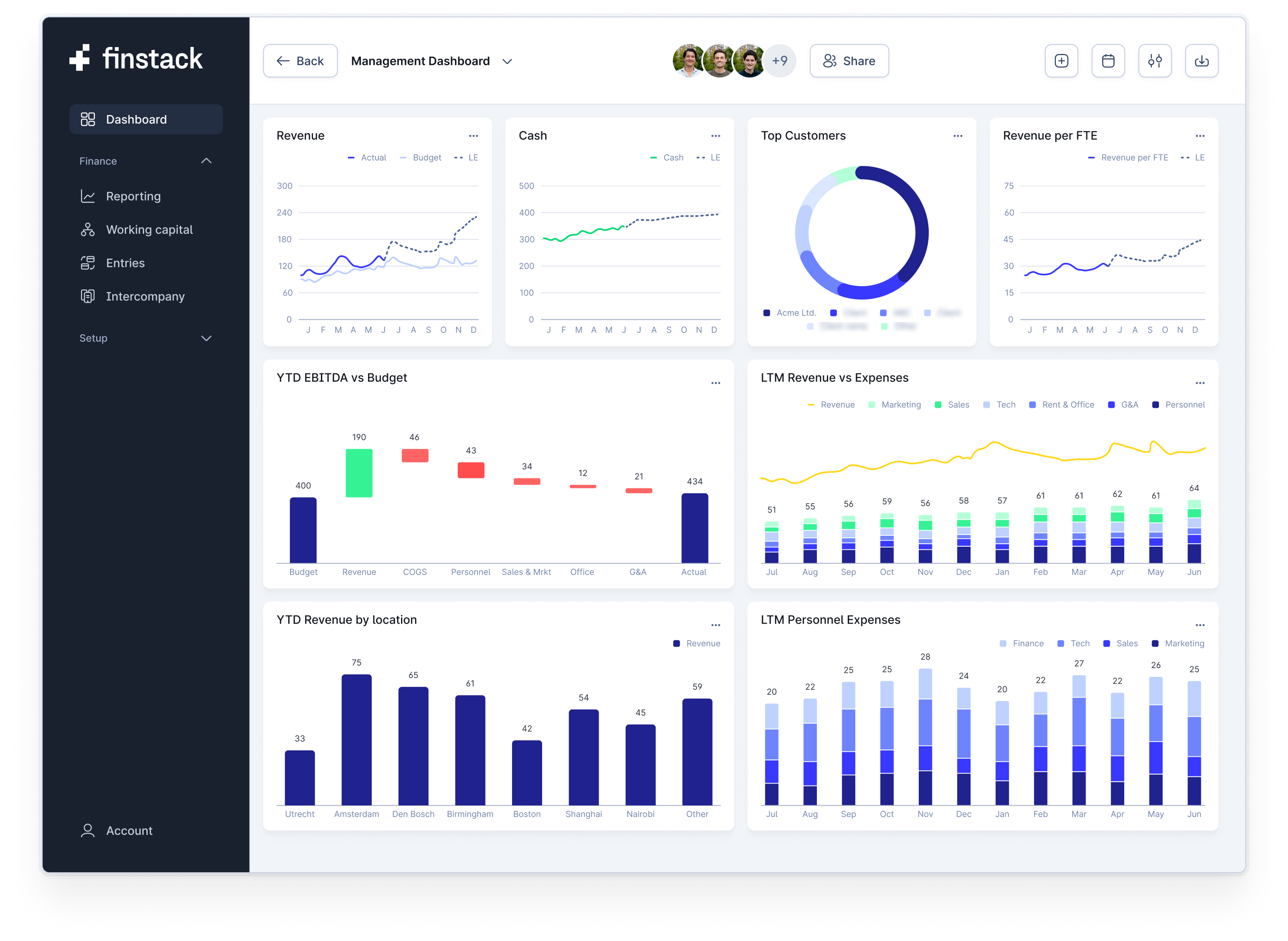
View P&L, Balance Sheet, and Cash Flow that update instantly with actuals. Switch between period and year-to-date views, slice by entity or business unit, and drill into the details.
Run multiple reporting views side by side. Investor reporting, internal dashboards, and management insights are all available in one clear platform.
Bring operational drivers and financial data together in one place. Upload payroll, working capital, or custom KPIs and connect them directly to your dashboards.
Stay on top of targets and variances. Track cash, receivables, and payables across teams and entities so you always know where you stand.
.png)
.png)
Create custom dashboards with your own KPIs, filters, and calculated fields. Design insights that match your business without complex tools.
Share the right view with the right people. Access controls and collaboration keep every stakeholder aligned while you stay in control.
Forecast smarter. Analyse faster. Always live actuals
Connector Pack includes the Finstack MCP connection. Connect Claude or ChatGPT once, and your assistant reads your consolidated numbers directly from Finstack: mapped, eliminated and always current, without exports or copy-pasting.
Then simply ask. Explain the variance in staff costs versus budget per entity. Write the commentary on the July numbers. List the receivables over 60 days that are new since last month. The answers come from the same data as your reports.
Unlike the spreadsheet sync, the AI connection is one-way and read-only. It follows your Finstack user roles, so everyone sees through their assistant exactly what they see in Finstack, and access can be revoked per user at any time.

.png)
Connect Finstack directly with your existing spreadsheets. Instead of uploading and downloading files, your data stays in sync in both directions with a single click. You keep the flexibility of the environment you know while gaining the structure, speed and reliability of Finstack.
Use your own models or start from ready made templates designed by finance experts. Actuals, forecasts and KPIs update automatically so you can stop worrying about broken formulas or manual errors. Every sync ensures you are working with the latest numbers and nothing falls behind.
Bring the best of both worlds together. Keep the freedom and familiarity of spreadsheets while removing the chaos that comes with versioning and scattered files. Finstack gives you one source of truth that feels familiar but works smarter.
Create, compare and manage multiple forecast versions without ever losing track. Whether you are stress-testing scenarios, updating assumptions or managing budgets across entities and cost-centers, Finstack keeps everything structured and transparent.
Drill into deviations and compare actuals against forecasts with ease. Every adjustment is tracked so nothing is lost, and you can always return to previous versions without confusion. This gives you clarity and consistency, even when plans change.
Ensure your team is always aligned on the right numbers. No more tangled spreadsheets or conflicting files. With Finstack, every scenario stays connected, every version is organized, and everyone works from the same source of truth.
.png)
Access to all features. No credit card required.
Get started for freeRead why users love Finstack
“Finstack is not just a reporting tool - it’s my lifeline as a CFO. It can manage our setup where branches are organized as cost centers."

"Finstack turned our fragmented Excel models into real-time financial reporting.
With flexible mappings and automated consolidation, we save time, reduce errors, and give investors the clarity they need to monitor the business."

"A great combination of reporting and interactive visuals that significantly speeds up our month-end process."

"With Finstack, we eliminated hours of manual work to consolidate our entities.
Automatic eliminations and real-time insights give us full control while staying focused on growing our business."

“Within hours, we went from scattered Excel sheets to one transparent platform. It’s become my daily tool across all companies I support.”

Enterprise grade features meet ease of use
See our pricing

.png)
Our software is implemented 3 times faster than the next best alternative on the market.
Our users save 90% of their expenses on time spend and tooling for monthly consolidation.
Time savings allow our users to report a return on investment of 350%, in their first month of using Finstack.
Our users save a minimum of 12 hours on their month-end close every single month.
.png)
Link your ERP, spreadsheets and AI to Finstack
See a demo


.png)
Haven't found your answer? Let us know

You can be up and running within 1 day. Connect your ERP, map your chart of accounts, and begin with automated consolidation, eliminations, and reporting. No heavy setup required.
Yes. Finstack handles consolidations across multiple entities, including intercompany eliminations, minority/non-controlling interest, and sub-group reporting. You can consolidate per group, region or business unit, with full visibility of eliminations and adjustments.
Finstack uses accounting-compliant FX rates. You can convert any currency to your reporting currency automatically, fix historical rates for consistency, or enter your own rates. All FX adjustments are preserved for past reports.
Absolutely. Finstack supports two-way spreadsheet integration. You can continue working in the spreadsheet environment you know, import or start from templates, and have them synced with your data, forecasts, and KPIs.
Very. Financial statements (P&L, Balance Sheet, Cash Flow) and KPI / performance dashboards are updated in real time with actuals. You can filter by entity, cost center, business unit, or custom dimension, compare versions, and track variances live.
You can make manual journal entries, one-off adjustments, revenue recognition before invoicing or cost capitalisation, or other custom adjustments without messing with your ERP. Finstack tracks everything and keeps reports audit-ready.
Security is a top priority. We use encryption (in transit and at rest), role-based access controls, secure hosting, and adhere to industry best practices to protect your data. Plus, version control ensures data integrity over time. The AI connection is read-only and can be revoked per user; Finstack does not train models on your data.
Finstack is flexible. You can add or remove entities, adjust ownership percentages, modify group or sub-group setups, and your consolidation & reporting structure will adjust accordingly. All changes are reflected across financial statements.
Yes, there is a free trial for 14 days (no credit card required) so you can explore all features. After that, we offer different plans depending on the number of entities & add-ons like the Connector Pack. Have a look at our pricing page for details.
Claude and ChatGPT, plus any assistant that supports MCP (Model Context Protocol). Paste one connection URL into your assistant and sign in with your Finstack account.
No. The connection is read-only.

Consolidated reporting and forecasting.




.svg)


.png)
.png)


.png)
.png)